mirror of
https://github.com/rvtr/wiki.git
synced 2025-10-31 06:31:13 -04:00

38 lines
3.0 KiB
Markdown
38 lines
3.0 KiB
Markdown
---
|
||
lang: zh-CN
|
||
layout: wiki
|
||
section: twilightmenu
|
||
category: other
|
||
title: 使用宽屏游玩
|
||
description: 如何在 Nintendo 3DS 中让 TWiLight Menu++ 使用宽屏
|
||
---
|
||
|
||
本章需要已破解的 Nintendo 3DS 系列设备,破解教程见[3ds.hacks.guide](https://3ds.hacks.guide)。如果访问过慢,请前往<0>https://stray-soul.com/index.php/3dshack-getstarted</0>
|
||
{:.alert .alert-info}
|
||
|
||
### 安装
|
||
1. 打开 FBI 并选择 `Remote Install(远程安装)`,然后选择 `Scan QR(扫描二维码)`
|
||
1. 扫描此二维码以下载最新版的[Universal-Updater](https://github.com/Universal-Team/Universal-Updater) (中国大陆地区可能访问体验很差,建议使用离线安装。)<br> 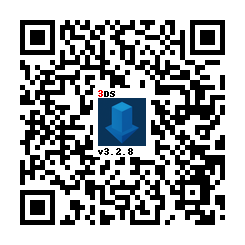
|
||
1. 从 HOME 菜单中打开 Universal Updater 。
|
||
1. 安装 TWPatch 包
|
||
- 如果你的主机网速感人,可以直接从此处下载 [TWPatch.cia](https://gbatemp.net/download/twpatch.37400/version/38832/download?file=302085) 然后用FBI安装
|
||
1. 返回 HOME 菜单并启动 TWPatch
|
||
1. 按住 <kbd class="face">Y</kbd> + <kbd class="face">B</kbd> 以启动补丁菜单,然后启用` Widescreen patch(384x240)`
|
||
1. (可选) 对于像素较小的宽屏游戏, 应同时启用 `GPU scaling (blurry, no filters)`
|
||
1. 按 <kbd class="face">B</kbd> 退出补丁菜单
|
||
1. 按 <kbd>START</kbd> 生成宽屏的 `TwlBg.cxi` 文件
|
||
- 如果顶部屏幕没有显示宽屏补丁已启用,则回到第 3 步
|
||
1. 将 `TwlBg.cxi` 从 `sd:/luma/sysmodules/` 移动到 `sd:/_nds/TWiLightMenu/TwlBg/` (如果不存在名为 `TwlBg` 的文件夹的话,创建一个), 然后重命名为 `Widescreen.cxi`
|
||
1. 重启 3DS,并按住 <kbd>SELECT</kbd> 以打开 Luma3DS 的配置
|
||
1. 启用 `external FIRMs and modules`,然后按 <kbd>START</kbd> 保存并退出
|
||
1. 打开TWiLight Menu++,在你想要的游戏上按 <kbd class="face">Y</kbd> ,调出游戏前的设置,并将 `屏幕长宽比` 设置为 `16:10`
|
||
|
||
已经完成了! 在宽屏幕中享受您的 DS 游戏吧!
|
||
|
||
**NOTES:**
|
||
1. 启动TWLMenu++时不要按住 <kbd>START</kbd> 或 <kbd>SELECT</kbd> 不然宽屏会看起来很奇怪!
|
||
1. 并非每个游戏都可以使用宽屏补丁。 [我们创建了一个宽屏兼容游戏的列表](https://github.com/DS-Homebrew/TWiLightMenu/blob/master/7zfile/3DS%20-%20CFW%20users/Games%20supported%20with%20widescreen.txt)
|
||
1. 如果在遵循指南,启动宽屏游戏后,所有 TWL_FIRM (包括 TWLMenu++ GUI) 都卡在宽屏, 删除位于 `sd:/luma/sysmodules/`的 `TwlBg.cxi` 然后 [卸载](https://wiki.ds-homebrew.com/twilightmenu/uninstalling-3ds) 并且 [重装](https://wiki.ds-homebrew.com/twilightmenu/installing-3ds) TWiLight Menu++, 然后重做教程,并保证使用原版Luma。
|
||
1. 大多数宽屏补丁只会针对宽屏调整3D元素,2D元素(如菜单)只会被拉长。
|
||
1. Luma3DS **must** be loaded from the SD card, if widescreen isn't working ensure that you have `boot.firm` in the root of your SD
|